


TickTick:To Do List & Calendar
4.68.01K Reviews
App Specs
- Version
- Varies with Device
- Updated On
- License
- Free
- Downloads
- 10,000,000+
- Developer
- TickTick Limited
- Categories
- Productivity
- Platform
- Android, iOS
Screenshots
 Analysis by AppCompare
My most useful test of a planner is an ordinary busy day: I need to remember a small errand, make room for a deadline, and still keep a personal routine from disappearing behind work. TickTick: To Do List & Calendar is built for bringing those different kinds of commitments into one place. I find that combination helpful when my plans change during the day, though it also means the app works best when I take a little time to decide how I want to organize things.
From scattered reminders to a workable plan
I would start by capturing tasks as they come to mind rather than trying to schedule every detail immediately. A quick list can hold the loose ends, while due dates, priorities, reminders, and subtasks help turn the important ones into actionable plans. For a larger job, breaking it down matters: “prepare a presentation” is easy to postpone, but smaller steps give me a clearer next move. The trade-off is that adding too much structure to every tiny task can make planning feel like another task of its own.
A practical routine is to review the list once at the start of the day, choose what genuinely needs attention, and then use the calendar view to see whether it fits around appointments. I would keep flexible errands as tasks instead of pretending they have a fixed start time, and reserve calendar space for commitments that must happen at a particular hour. That distinction makes the schedule more believable and helps prevent a crowded calendar from looking like a promise I cannot keep.
A realistic day, from capture to completion
Imagine I have a morning appointment, a work deadline, groceries to pick up, and a goal to practice a language. I can keep the appointment visible alongside the day’s tasks, split the deadline into a few smaller actions, and set a reminder for the errand if I am likely to forget it while out. The habit tracker can give the language practice a recurring place in my routine, while the Pomodoro timer can help me begin a focused work block instead of waiting for motivation to appear.
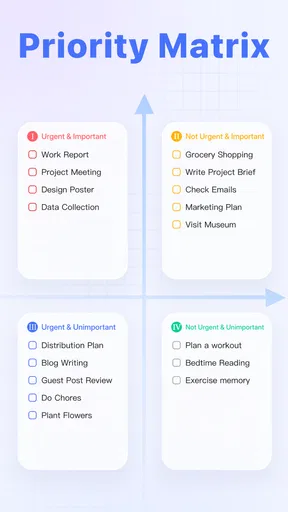
The useful part is not simply seeing everything on one screen; it is being able to adjust the plan when the morning runs late. I can move a task to a more realistic time, leave a flexible item unscheduled, and still retain the reminder that makes it hard to overlook. I would avoid treating every task as equally urgent: priorities are most meaningful when I use them selectively, rather than marking the whole list as important.
When tasks need to leave your own list
Shared lists make sense for work that has a clear handoff, such as planning a family gathering or keeping a group project’s next steps visible. Instead of sending a separate message for every small update, I can put the relevant task where the people involved can see it. This is most useful when the list itself is the shared source of truth; if the group relies on long discussions, detailed approvals, or formal project reporting, a dedicated team platform may be a better fit.
For personal use, I would also be careful about what I share. A household shopping list is an easy candidate, while private notes or individual routines may be better kept in a personal list. Sharing can reduce the “who was supposed to do that?” problem, but it only helps if everyone checks the shared space and understands what the tasks mean. The app does not remove the need to agree on ownership; it gives the group a place to make that agreement visible.
Worth Reading Before You Choose

EA SPORTS FC Mobile 26 Is a Bigger Football Game, but It Takes Time

Flipboard Shows What News Apps Must Do Beyond the Feed

Switching to Android Auto Means Rethinking Your Driving Routine

Google Calendar Makes a Crowded Week Easier to Manage

Ludo King Makes the Most of the Minutes Between Plans

Baby Panda World Brings Quick Play to Modern Phones, but Its Game Library Feels Busy
Where the workflow can snag
Putting tasks, calendar events, habits, and focus sessions together can make TickTick feel like a complete command center, but that breadth brings a learning curve. New users may need to experiment before deciding which view they prefer and how much detail to attach to a task. I would begin with one or two lists and a simple daily review, then add habits or shared workflows only when there is a real need. Turning on every organizational option at once can create more upkeep than clarity.
Calendar integration is valuable when I want to compare tasks with appointments, but an integrated view is not a substitute for checking that my schedule is current. External calendars and task lists serve different purposes: an event reserves a time, while a task describes work to do. Keeping that difference clear prevents me from assuming that adding a deadline has also blocked out enough time to meet it. If a schedule depends on several people’s availability or strict project timelines, a calendar-first or team-focused alternative may suit that situation better.
Who is likely to get the most from it
I would recommend this style of planner to someone who regularly switches between personal responsibilities and work or study, and wants tasks, reminders, calendar planning, habits, and focus sessions close together. It can also help a person who tends to remember commitments at inconvenient moments: capture the task first, then decide later whether it needs a date, a reminder, or a smaller sequence of steps. The app is less compelling for someone who only wants a bare checklist and finds categories, routines, and multiple views distracting. A simpler notes app or built-in task list may be easier if all you need is a handful of reminders.
It is free to start, with in-app purchases ranging from $0.99 to $35.99 per item, so I would try the everyday workflow before deciding whether any paid option is worth considering. The app is made by TickTick Limited, has an Everyone age rating, and has been available since June 19, 2013. It has an average rating of 4.6 from around 156,000 ratings, with about 7,800 reviews and over 5 million installs. Those figures suggest a widely used planner, but they do not tell me whether its mix of features will suit an individual routine; that comes down to whether I will actually maintain the system I set up.
First Impressions and User Interface
Right off the bat, TickTick greets you with a clean, intuitive interface. It’s like stepping into a well-organized office where everything has its place. The design is sleek and modern, which is a breath of fresh air compared to some cluttered apps out there. Navigating through various features feels smooth, and even if you’re not a tech wizard, you’ll find yourself mastering it in no time.
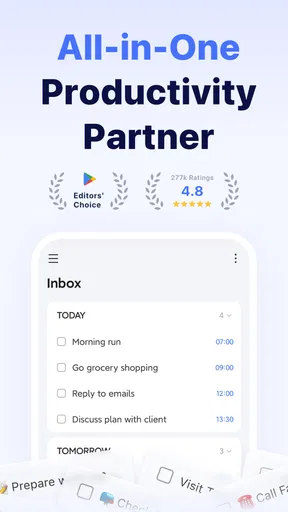
The app's dashboard gives you an overview of your tasks, calendar events, and habits. You can easily switch between different views, such as list or calendar, depending on what suits your style. The customization options are a nice touch, allowing you to tweak your experience to match your personal workflow.
Features Galore
One of the standout features of TickTick is its versatility. Whether you're a student, a busy professional, or a parent juggling multiple schedules, this app has something for everyone. Here’s a rundown of some features that caught my eye:
- Task Management: Create tasks with due dates, priorities, and even add subtasks to break down larger projects. You can set reminders so nothing slips through the cracks.
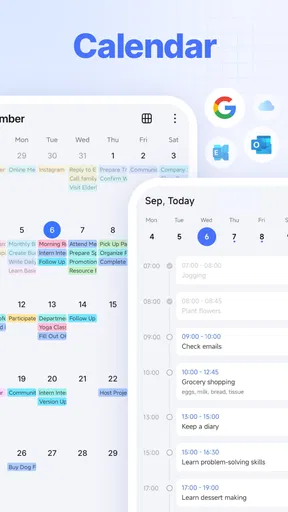
- Calendar Integration: Sync your calendar events seamlessly. The app supports Google Calendar and Outlook, making it easy to keep everything in one place.
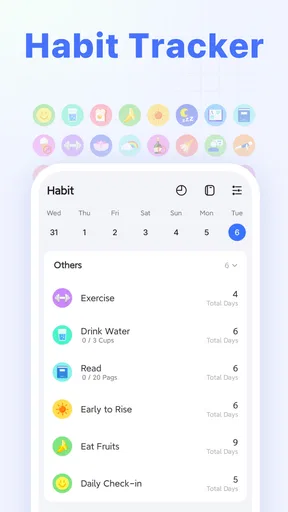
- Habit Tracker: Want to build a new habit? This feature lets you track your progress and stay motivated with streaks and stats.
- Collaboration: Share lists and tasks with others, whether it’s for a work project or planning a family event.
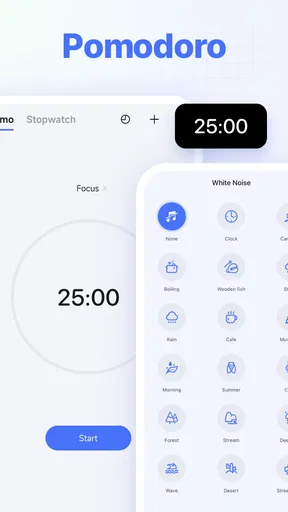
- Pomodoro Timer: Boost your productivity with the Pomodoro technique that helps you focus and manage your time effectively.
In-Depth Look at Calendar and Task Sync
The integration of tasks and calendar in TickTick is seamless. Switching between these views helps in visualizing your schedule and ensuring that you’re on top of everything. I particularly loved how you can drag and drop tasks into your calendar, instantly seeing how they fit into your day.
Moreover, syncing with external calendars like Google and Outlook is a breeze. You don’t have to worry about missing out on important meetings or deadlines. It’s all there, neatly organized, ready for you to tackle.
Building Habits and Staying Motivated
We all know building habits is tough, but TickTick makes it a bit easier. The habit tracker is a nifty feature that keeps you accountable. It's satisfying to see your streak grow, and the app's reminders ensure you stay on track. Whether it’s exercising, reading, or drinking more water, this feature is a game-changer for personal growth.
Collaboration and Sharing
If you’re working on a team project or planning a group event, TickTick’s collaboration features are invaluable. You can share lists and tasks with others, assign duties, and keep everyone in the loop. It’s like having a virtual assistant that everyone can access and update in real-time.
Pomodoro Timer: Focus and Efficiency
The Pomodoro Timer is a fantastic addition for anyone looking to boost their focus. You set a timer for 25 minutes of work followed by a short break. This cycle helps maintain concentration and maximize productivity. I found it particularly useful for those days when distractions are everywhere.
Overall, the TickTick: To Do List & Calendar app is an impressive tool that can transform the way you manage tasks and time. Whether you're someone who thrives on structure or just needs a little nudge to stay organized, this app covers all the bases. Its combination of task management, calendar sync, habit tracking, and collaboration makes it a powerhouse in the productivity category. Give it a try and watch your productivity soar to new heights!
Pros
- User-friendly interface for easy navigation.
- Seamless synchronization across devices.
- Customizable reminders and notifications.
- Integration with multiple calendars and apps.
- Offline functionality for tasks and notes.
Cons
- Limited features in the free version.
- Premium subscription can be costly.
- Occasional sync delays across devices.
- Some advanced features require learning curve.
- Limited third-party integrations.
FAQs for TickTick:To Do List & Calendar
What features does TickTick offer for task management?
TickTick provides a range of features to help manage tasks efficiently. These include setting priorities, deadlines, recurring tasks, and reminders. It also offers a calendar view for better planning, allowing integration with popular calendar apps. The app supports tags and lists for organizing tasks, making it a versatile tool for personal and professional use.
Is TickTick available on both Android and iOS platforms?
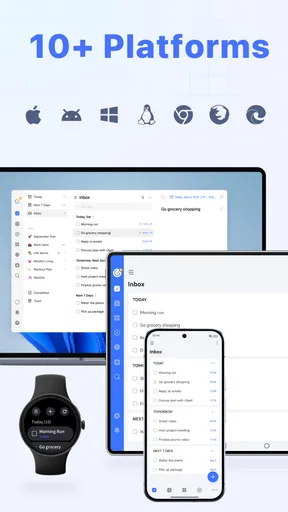
Yes, TickTick is available for both Android and iOS devices. Users can download it from the Google Play Store or the Apple App Store. The app also offers a web version and desktop apps, providing seamless synchronization across all devices, ensuring you can manage your tasks from anywhere.
Does TickTick support collaboration with other users?
TickTick allows collaboration on tasks and projects, making it suitable for team use. You can share task lists with colleagues, friends, or family members. It also supports comments and attachments on tasks, facilitating communication and ensuring everyone stays on the same page, enhancing productivity in collaborative environments.
Are there any in-app purchases or subscription plans in TickTick?
While TickTick offers a free version with essential features, it also provides a premium subscription. The premium version unlocks additional features such as advanced calendar views, customizable filters, and more task limits. Users can choose monthly or yearly subscription plans, offering enhanced functionality for those needing more comprehensive task management capabilities.
How secure is my data in TickTick?
TickTick emphasizes user data security, using encryption to protect information. The app ensures that your data is secure in transit and at rest. Additionally, it offers backup options and synchronization across devices, ensuring that your task data is not only secure but also recoverable in case of device loss or failure.


